Our Solutions
Explore our complete suite of professional tools designed to grow your business.
Grow Your Business
Power Your Work
- Success Stories
- Support
6 min read
How to Use Zillow Preview to Highlight Your Pre-market Listings
A step-by-step guide for agents and brokers using Zillow Preview

Written by Zillow on March 27, 2026
For 20 years, Zillow has stood for one simple idea: real estate works better when information is open and accessible.
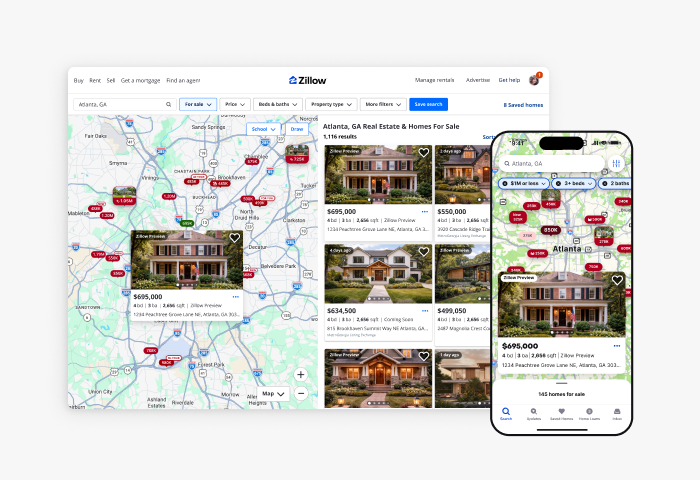
Zillow PreviewSM builds on that belief by making pre-market listings visible to all consumers on Zillow and Trulia before they go active in an MLS. It’s not private. Zillow Preview is all about being public.
This gives agents a way to publish and manage a listing during the pre-market window while keeping visibility broad and open. Here’s how to get started with Zillow Preview.
Step 1: Know your local MLS rules
Before you think about pre-marketing, know what is allowed (and not allowed) in your local market. Zillow Preview is structured to work within MLS frameworks, but it's up to brokers and agents to know and follow their local MLS rules and regulations.
Step 2: Decide your pre-market strategy for listings
Before creating a listing, align with your seller on:
- Timing (when the home is expected to go active)
- What information to share (price, photos, listing details)
- Your marketing strategy
Zillow Preview is an optional public pre-marketing approach. Agents and sellers can choose whether to use it alongside their broader listing strategy, in accordance with local MLS rules.
Step 3: Publish the listing as a Zillow Preview
Agents at participating brokerages who have signed an agreement with Zillow can publish a Zillow Preview listing through Zillow Workspace to make it publicly visible during the pre-market window.
To create a Zillow Preview listing:
- Set up Zillow Workspace
- Create or log into your Zillow Workspace account
- Verify your identity and link your MLS membership
- Create a new listing
- Start a new listing from your dashboard
- Add photos and media
- Upload your own photos, invite a photographer, or order media through a Zillow Media Experts or Aryeo Pro photographer
- Review and organize images before publishing
- Complete listing details
- Enter key information about the home
- Add an expected on-market date, which determines when tours can begin
- Choose whether to display Days on Zillow during the Preview period
- Review and publish
- Confirm listing details, brokerage information and attribution
- Publish the pre-market listing
Once published, the listing is typically live on Zillow and Trulia within minutes and is labeled as a Zillow Preview listing. If an agent needs to remove the Zillow Preview listing for any reason, they can do so easily by changing the listing status in Zillow Workspace.
Step 4: Manage your listing
After publishing, you can update and manage your listing as your strategy evolves. Zillow Preview listings are meant to be short-term. Once a listing moves into an active status, it is entered into the MLS and follows the standard IDX and VOW distribution process.
Update your listing as needed
- Edit price, photos and listing details at any time
- Re-publish updates directly from Zillow Workspace
- Adjust how information appears as your strategy evolves
During the Zillow Preview period, if the agent and seller choose to display days on Zillow on the Zillow Preview listing, that count will continue once the listing becomes active in the MLS. Buyer engagement stats — including saves and views of the listing — also carry over once the home becomes an active listing, so interested shoppers continue to see the existing engagement when they view and receive updates on the property.
Step 5: Allow buyers to engage early and understand how your listing is performing
Once your listing is live, you can begin tracking buyer interest and engaging with potential buyers before it goes active.
Track early engagement signals
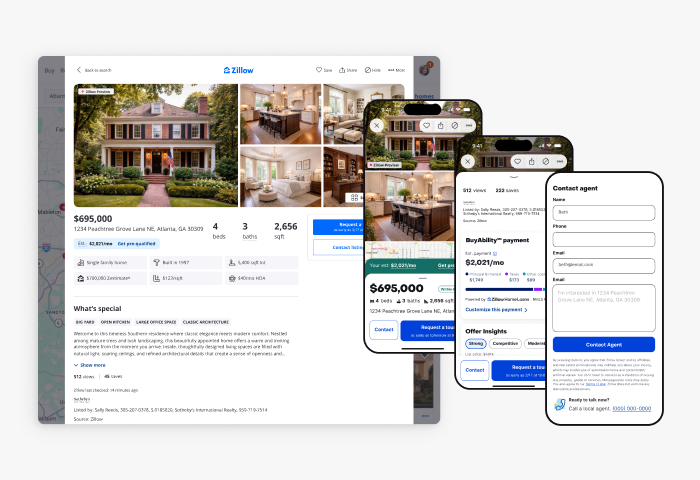
- Zillow Preview listings generate real-time engagement data including views, saves and shares.
These insights update frequently and can help you understand how buyers are responding, gauge demand early and adjust pricing or positioning before the listing is active in the MLS.
Understand how buyers discover and engage
During the Zillow Preview period, your listing is visible to anyone browsing Zillow and Trulia. During this window, buyers can:
- View the home in search results
- Save and share the listing
- Receive alerts when new Zillow Preview listings match their searches and again when those homes are fully active
- Contact the listing agent directly
- Pre-schedule a tour for when the home goes active
This creates a solid pipeline of interested buyers before the listing is active, helping you and your seller prepare to bring the listing to market with stronger demand.
When a buyer reaches out to the listing agent directly through a Zillow Preview listing, those connections are provided to the listing agent for free.
In some cases, listing agents may also have the opportunity to earn a share of revenue when a buyer who connects through a Zillow Preview listing closes with a Zillow Preferred agent — at no additional cost to consumers or agents.
Step 6: Enter as active in your MLS
When the home is ready and entered into the MLS for distribution to MLS participants’ sites, the Zillow Preview listing transitions into the standard for-sale experience on Zillow automatically.
Enter the listing into the MLS
- Agents remain responsible for entering listings into their local MLS in accordance with their local MLS rules and timelines
What happens on Zillow
- The MLS-sourced listing becomes the primary version of the property on Zillow
- Once the listing is active and distributed via MLS IDX or VOW, it transitions into a standard for-sale listing on Zillow; Zillow displays the listing according to its standard display practices through IDX or VOW feeds
- The Zillow Preview label and associated features are removed. If you are a Showcase customer, this is when your listing converts to Showcase
- Existing listing links, buyer inquiries and scheduled tours carry forward to the active listing
From this point on, the listing continues through the standard on-market process, with the added benefit of having already built early awareness and demand.
Bringing pre-market listings into the daylight
In many markets, pre-market listings are not widely visible to the public. By making these listings publicly available, Zillow Preview helps expand visibility at an important stage of the listing process.
When used as part of your overall listing strategy, Zillow Preview can help you build early awareness and prepare for a stronger launch once your home goes active. More information about how to use Zillow Preview to highlight your pre-market listings can be found here.
Tips for top-performing listings
Backed by new research, this guide reveals what today’s top listings do differently to capture buyer attention and outperform the rest.
Learn more